Ways to Make a 3D Printer Quieter

Does the noise your 3D printer makes while printing your designs bother you? If you're like most people, you're probably looking for a way to quiet it down. In this article, I'm going to show you the best ways to quiet a 3D printer.
Replacing the motherboard:
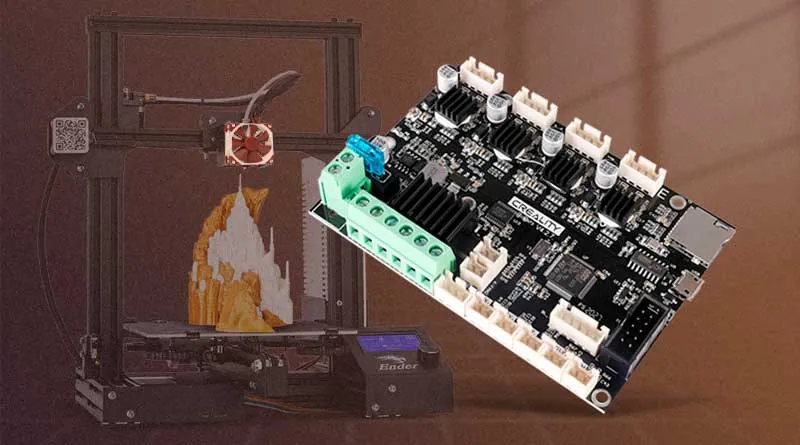
One of the best ways to make a 3D printer quieter is to replace the motherboard.
If you have an Ender 3, Ender 3 PRO, or Ender 5 PRO, for example, you can opt for the TCM 2225 silent motherboard.
This motherboard uses quiet stepper motor controllers and can significantly reduce the noise from your 3D printer.
In addition, this update can also improve the quality of your prints, since the TCM2225 motherboard can provide greater precision in the printer's movements.
Below is the link to Amazon for the TMC2225 controller board for the Ender 3 / Ender 3 Pro / Ender 3 V2 / Ender 5 / Ender 5 Pro
View all brands and models of quiet motherboards (Be sure to check your printer model carefully)
Replacing the fans:
The fans in a 3D printer are another major source of noise. That's why replacing them can be a good solution.
The Noctua fans They're an excellent choice, since they're quieter than standard fans. Plus, you can install Noctua fans using custom adapters to make them fit your printer.
I'll leave you the link to the Noctua fans in case you want to check them out on Amazon.
Another option is the Super-quiet fan, these fans are just as quiet as the Noctua ones, although are more affordable They can be a good option if you want a quiet 3D printer.
Making these changes requires some technical knowledge, since Noctua fans are 12V, while the original Ender 3 fans are 24V.
Therefore, you'll need to be very careful if you decide to change them. Search for videos on YouTube to get all the information you need beforehand.
Video channel: BricoGeek
Use vibration dampers:
Shock absorbers are parts that are installed between the motors and the printer's frame. These components can absorb the vibration generated and reduce the noise from your 3D printer's motor.
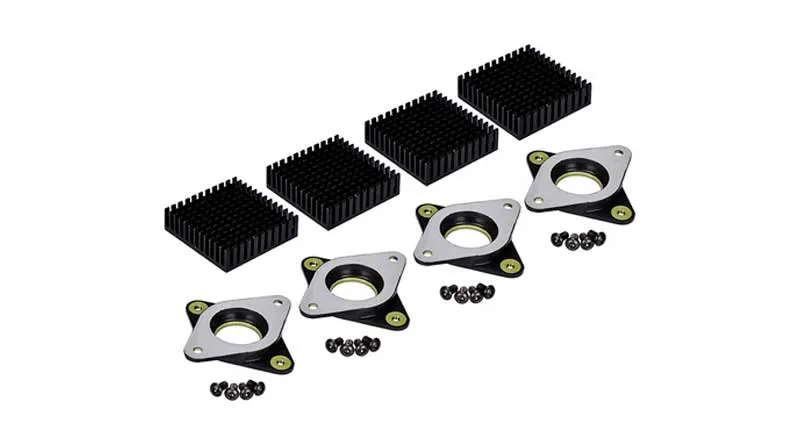
Shock absorbers can be an effective solution for reducing the noise from a 3D printer.
They are recommended for the Ender 3, since on other 3D printer models they can overheat and cause step skipping.
Video channel: Teaching Tech (Turn on subtitles)
Putting the printer away:
Soundproofing can be an effective way to reduce the noise from a 3D printer. This can be done by placing the printer in a soundproof cabinet or enclosure.
This way, you can reduce the noise generated by the printer and maintain a quieter environment.
In addition, the case can also help maintain a more consistent temperature, which can improve print quality.
If you decide to enclose your printer, make sure the enclosure is ventilated and has enough space for the 3D printer to operate smoothly.
You can build your own using a few basic materials. Here you can see the prices for some panels made of Self-adhesive acoustic foam on Amazon.
Conclusions on how to make a 3D printer quieter:
As you can see, there are several effective ways to quiet a 3D printer. From replacing the motherboard, fans, and vibration dampers to enclosing the printer, each method has its pros and cons.
Before choosing an option, You should consider how much time and money Are you willing to invest?.
For example, replacing the motherboard and fans may be more expensive than simply adding a few vibration dampers. In addition, some options may require technical and DIY skills to install them properly.
The option you choose will depend on your specific needs and how much you're willing to spend. With any of these options, you can reduce the noise from your 3D printer and continue printing in peace and quiet.
Before making any changes to your 3D printer, it's important to do your research and make sure you know what you're doing.
And if you don't feel comfortable making changes to your 3D printer's electronics, You can always seek professional help.
Frequently Asked Questions:
Is it safe to replace the motherboard in a 3D printer?
Yes, it's safe to replace the motherboard in a 3D printer as long as you know what you're doing and have experience with electronics and programming. If you're not sure how to do it, it's best to seek help from someone with experience in this area.
How loud can the fans on a 3D printer get?
The fans in a 3D printer can be quite noisy, depending on the printer's model and brand. In general, high-speed fans tend to be noisier than low-speed ones. Noctua fans are an excellent choice for reducing noise from your 3D printer.
Do vibration dampers really help reduce the noise from a 3D printer?
Yes, vibration dampers can help reduce the noise from a 3D printer by absorbing the vibrations generated during printing. However, it’s important to note that not all vibration dampers are the same, and some may be more effective than others.
Do I need to enclose my 3D printer to reduce noise?
Not necessarily. Enclosing a 3D printer can help reduce noise, but it can also raise the temperature inside the print chamber, which may affect print quality. If you decide to enclose your 3D printer, make sure the temperature inside the print chamber does not exceed the limits recommended by the printer manufacturer.
Thank you for visiting. I invite you to read: “How to Store 3D Printing Filaments”A post you might find interesting.".
Responses