How to Clean a 3D Printer Nozzle (All Options).

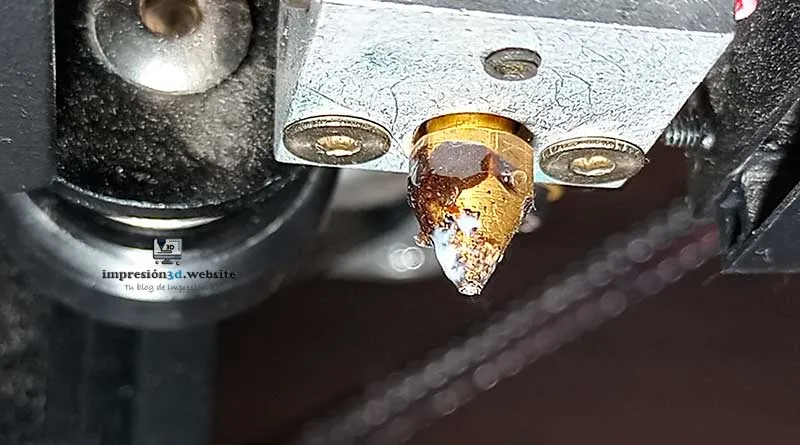
The nozzle of a 3D printer tends to accumulate a large amount of plastic, which, if not cleaned, burns and turns black over time.
This poses a risk to the quality of the parts, since if burnt plastic comes loose, the nozzle can leave black spots around the printed models.
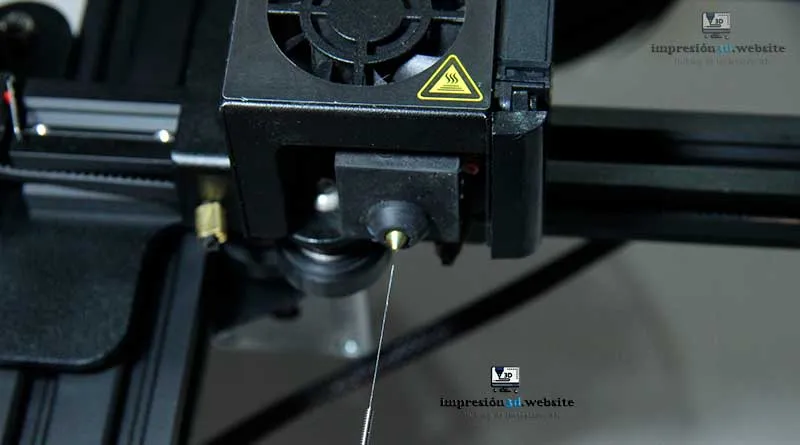
One of the signs that the nozzle needs cleaning is that when you extrude the filament, it doesn't flow downward consistently but instead bends. to one side.
The filament should always extrude smoothly downward (without veering to one side).
Today I want to do A list of the different ways to clean a 3D printer nozzle (inside and out), since keeping the extruder nozzle clean It can save you money and also provide you with high-quality 3D-printed parts.
To clean the nozzle, the hot end must be hot.
1. Keep the nozzle clean
One of the best ways to clean is to find the source of the dirt and eliminate it at its root.
When it comes to 3D printer nozzles, the reason they get dirty is because you never clean them and you let the plastic pile up.
You should always clean the nozzle before and after using the 3D printer.
Use a cloth or paper towel to clean the nozzle (being very careful not to burn yourself), since you need to do this while it's still hot, when the plastic is soft.
Get into the habit of cleaning regularly, before and after each print and you'll see that your printer's nozzle will not only always be clean, but it will also last much longer, saving you money.

2. Use a pair of tweezers to remove the burnt plastic
If the melted filament has stuck to the nozzle and won't come off with a cloth, use tweezers or pliers to remove it.
In this case, you can adjust the temperature to soften it and make it easier to peel off.
Try setting the temperature between 150 °C and 215 °C, and then carefully remove the plastic stuck to the nozzle.

3. Cold Start
One of the options for clean the inside of the nozzle is to use the cold pull method, which involves lowering the nozzle temperature to 90 °C and then pulling the filament until it is completely removed.
To use this method, you must make sure the nozzle is hot (at the temperature at which the filament melts) and with the filament inside the nozzle, including extruding it a little by hand.
Next, lower the temperature to 90 °C, and then simply pull on the filament until it comes out or “peels away” from the nozzle and comes out completely.
You may feel a little resistance when pulling, but the filament will come loose with a slight sound as it does so.
Some people recommend using PETG filament, which melts at a higher temperature and sticks to the PLA, allowing you to remove everything together.
4. 3D Cleaning Filament
There are 3D filaments whose main function is to clean the nozzles. These filaments work just like regular filaments, melting and cleaning the inside of the nozzle as they are extruded through it.
Heat the nozzle to the temperature recommended by the manufacturer, then feed the filament manually so that it is extruded through the nozzle.
Let the filament sit for a few minutes, then extrude a little more.
After this process, the nozzle should be clean. (You can also use the cold pull method with this filament.)

5. Use a soldering iron
One of the most important requirements when cleaning the printer nozzles is that the nozzle be hot.
After doing a little research on YouTube, I discovered that several people are using a trick with a soldering iron that seems to be both effective and convenient.
The trick is to use a soldering iron to heat an aluminum block onto which you'll screw the nozzle.
Then you'll use a wire brush to clean the outside and a clear filament to clean the inside.
I thought it was an interesting method, so I wanted to share it with you
YouTube video: 3D Bugeo
6. Dip the nozzles in pure acetone
Another option for cleaning the nozzle is to chemically dissolve the stuck-on plastic with liquid acetone.
To do this, submerge the nozzle in a container of pure acetone for several hours.
The plastic debris should come loose.

7. Burn and submerge in water
I do not recommend this option for safety reasons And if you do it wrong, you could break the nozzle or even burn your hands.
I'm including this option just because it exists, and it's something some people do.
I want to make it clear that everyone is responsible for their own actions. (I no (I recommend it.).
YouTube video: Vision Miner
8. Using the needles
Usually, when you buy a 3D printer, it comes with some long, thin needles as accessories that are used to clear clogs in the nozzles.
These needles can be used to clear blockages, such as melted plastic residue, that are obstructing the outlet.
I recommend exercising caution when using these needles because they can scratch the inside of the nozzle, which may cause problems.
9. Conclusions
Remember that the best way is always to keep the nozzle clean. You should wipe it down with a cloth or napkin before and after printing.
If there are plastic fragments Use a pair of pliers or a pair of nippers, or any tool that helps you remove the molten plastic.
For the most difficult cases, use the needles and the cold pull (as many times as necessary).
I also think the option of soaking it in pure acetone is a good one.
For the other options (which are also valid), I highly recommend CAUTION, since it is necessary to work with hot parts and there may be risk of burns.
I wouldn't recommend working with fire or torches, since I consider it very dangerous, Before you burn it out, I'd rather you just buy a new nozzle and be done with it—they're cheap anyway.
I invite you to read a post that might interest you: Borde Skirt or Balsa Skirt: Which One Should You Wear in Cura?
[…] To round out your reading, I recommend checking out the following post: How to Clean a 3D Printer Nozzle (All Options) […]